While JSX serves as our visual templating language, allowing us to embed JavaScript expressions directly into the UI, the real engineering challenge lies in managing user input and state transitions efficiently.
This guide dives deep into the mechanisms that make React performant: SyntheticEvents, memory-conscious event binding, the asynchronous nature of state, and the Virtual DOM diffing algorithm.
1. Handling Events with SyntheticEvents
React doesn't rely on standard HTML event handling. Instead, it abstracts the browser’s native system through SyntheticEvents. This isn't just a syntactic preference (e.g., using camelCase onClick instead of lowercase onclick); it is a crucial performance optimization.
The Power of Event Delegation
React attaches a single event listener at the root of the DOM tree. When you click a button deep in your component hierarchy, that event bubbles up to the root, where React’s top-level listener intercepts it and determines which component handler to execute. This "event delegation" drastically reduces the application's memory footprint by avoiding attaching thousands of individual listeners to specific DOM nodes.
The "Gotcha" of Event Pooling
To further optimize memory, properties in SyntheticEvents are nullified immediately after the event callback executes—a process known as "event pooling." This means you cannot access event properties asynchronously by default.
Crucial: If you need to access an event object inside an asynchronous operation (like a setTimeout or an API fetch), you must call event.persist() on the event immediately. This tells React not to reclaim that event object back in the pool.
| Feature | Synthetic Events (React) | Native Browser Events |
|---|---|---|
| Consistency | The API is consistent across all browsers. | Behavior varies by browser engine. |
| Performance | High; uses single-node event delegation. | Lower; requires listeners to be attached to individual nodes. |
| Memory | Objects are pooled and reused. | Events persist until garbage is collected. |
| Async Use | The use of event.persist() is necessary for delayed access. | By default, it is fully accessible asynchronously. |
2. The Art of Event Binding (Class Components)
Note: While modern React heavily favors functional components and Hooks, understanding class component binding is essential for working in existing enterprise codebases.
In class components, preserving the "this" context is mandatory for accessing component properties inside handlers. Choosing the right technique is a matter of managing memory lifecycles.
Constructor Binding (Best Performance):
Defining this.handleClick = this.handleClick.bind(this); in the constructor happens once during the initialization phase. The function instance is reused across every render cycle.
Arrow Functions in Class Fields (Modern Syntax):
Defining handlers as handleClick = () => { ... } automatically captures the this context. It's cleaner than constructor binding but technically slightly more memory-intensive.
Inline Arrow Functions (Anti-Pattern):
Defining handlers directly in JSX, e.g., <button onClick={() => this.doSomething()}>, is generally discouraged in complex apps. It creates a new function instance on every single re-render cycle, leading to unnecessary garbage collection churn and potential re-renders in child components that rely on referential equality checks.
3. State Management & The setState Method
State is local, private data that determines a component’s behavior. Unlike read-only props passed down from parents, state is managed internally.
The Asynchronous Trap
To update the UI in class components, you must use the setState method; direct assignments to this. state will not trigger a re-render.
WARNING: State Updates Are Asynchronous
React batches multiple setState calls together in a single update cycle to optimize performance. Consequently, this.state may not reflect the new value immediately after the call.
If your next state depends on the previous state (e.g., incrementing a counter), never rely on this.state directly within the update. Instead, use the functional form of setState:
JavaScript
// Correct: Uses the guaranteed latest state snapshot
this.setState((prevState, props) => ({
 count: prevState.count + 1
}));
Shallow Merging vs. Replacement
Class Components (setState): React performs a shallow merge. If your state is { name: 'Bob', age: 25 } and you call this.setState({ age: 26 }), the name property remains untouched. Note: this mechanism only applies to the top level; nested objects must be manually spread and merged.
Functional Components (useState): The useState hook replaces the state value entirely. You are responsible for manually merging existing properties using the spread operator (...state) if your state is an object.
4. Under the Hood: Re-rendering & the Virtual DOM
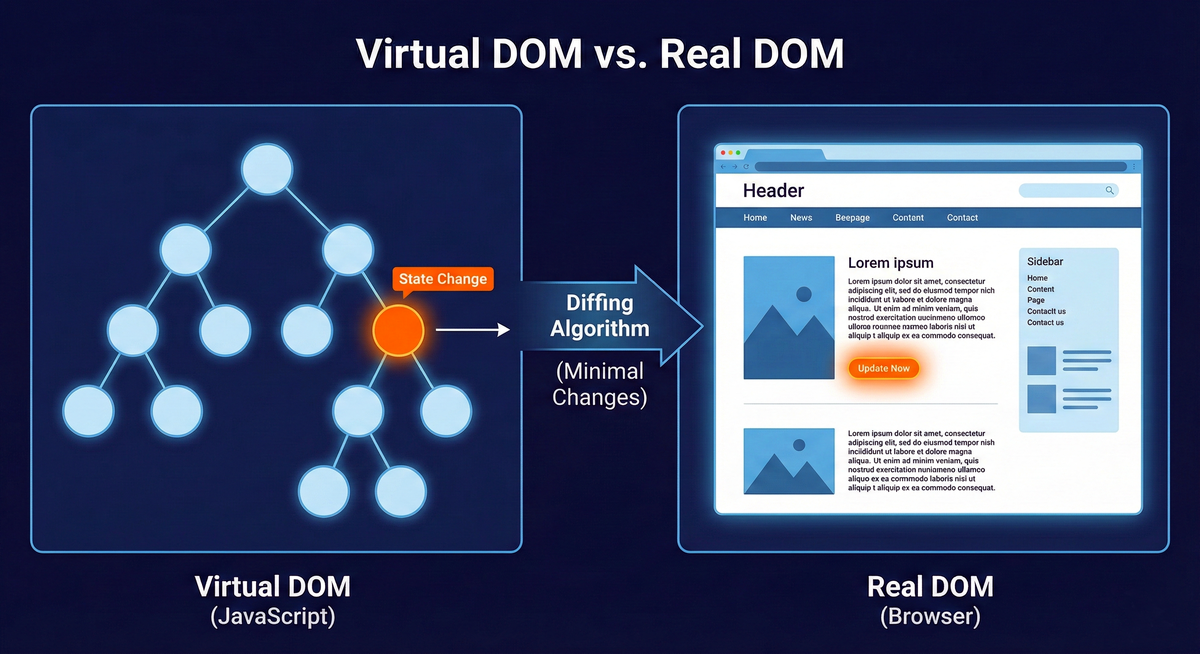
React's efficiency is driven by its diffing algorithm. When state or props change, React doesn't immediately touch the browser DOM.
It creates a new Virtual DOM—a lightweight JavaScript representation of the proposed UI.
It compares this new tree with the previous version to identify the minimal set of changes.
It batches these specific changes and applies them to the real browser DOM.
For example, changing text from "Hello, Alice" to "Hello, Bob" results in React updating only that specific text node, rather than repainting the entire container.
Optimization Strategies
By understanding this process, we can help React optimize:
The Key Prop: In lists, the key attribute is essential. It tells React how to identify items across re-renders, preventing the inefficient destruction and re-creation of DOM nodes when lists are reordered.
React.memo() and PureComponent: These tools allow React to skip re-rendering a component entirely if its props have not changed via a shallow comparison.
Component Splitting: Isolate state updates by breaking large components into smaller units. This ensures that only the necessary slice of the UI re-renders when data changes.
Summary
By mastering memory-safe event binding, respecting the asynchronous nature of state updates, and leveraging the Virtual DOM's diffing process, you move beyond simple layouts to create interfaces that are responsive, predictable, and scalable.