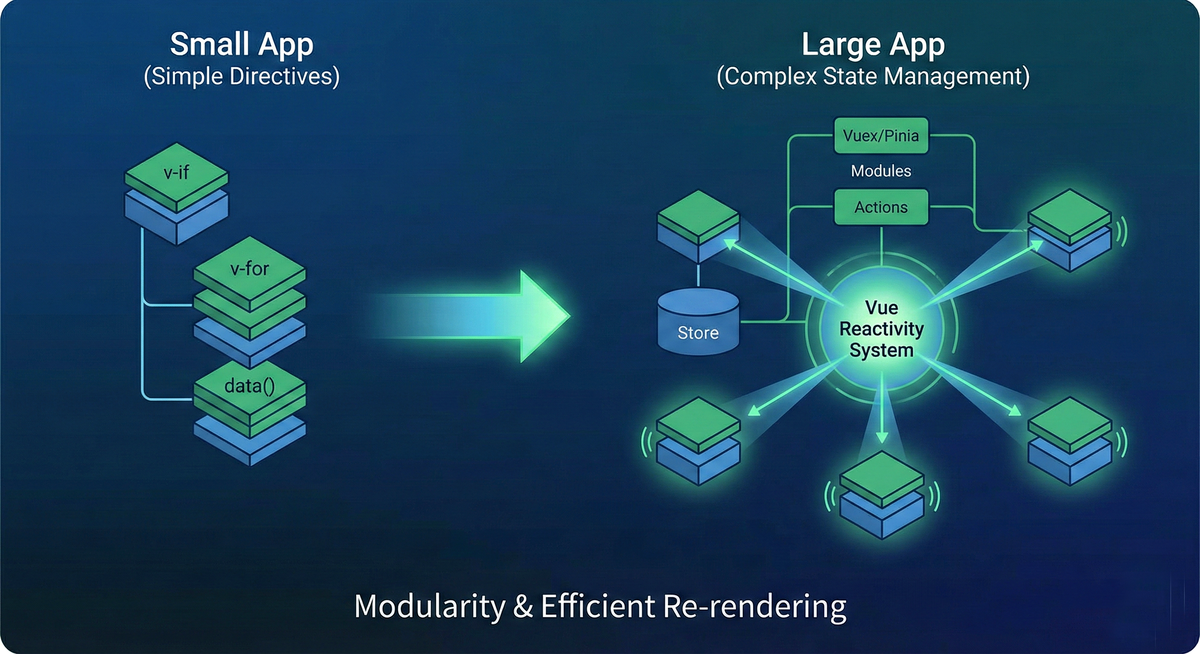
The journey into modern frontend development often begins with a sense of wonder. You type a few lines of code, perhaps a simple binding in Vue or a JSX component in React, and the browser immediately reflects your changes. It feels magical. However, as applications grow from simple prototypes into enterprise-scale behemoths containing hundreds of components and complex data requirements, that initial magic can quickly turn into a nightmare of spaghetti code, prop-drilling, and performance bottlenecks.
True engineering mastery lies in the transition from writing code that works to designing systems that scale. This requires moving beyond simple directives and embracing complex state management, understanding the nuances of rendering cycles, and making informed architectural decisions.
This guide explores advanced concepts in Vue.js component logic, contrasts its optimization strategies with the React ecosystem, and provides a framework for choosing the right tool for the job.
Advanced Vue Component Logic: Scaling via Reactivity
When building small applications in Vue, the built-in directives like v-if, v-for, and simple local data properties are sufficient. Everything feels intuitive and contained.
However, scaling an application introduces a critical new challenge: state fragmentation. As your application grows in scope, data needs to be shared across components that are far apart in the hierarchy. Relying solely on props and events to pass data up and down five levels deep leads to fragile, hard-to-maintain code.
Maintaining modularity while managing global state is key to scaling. While external libraries like Pinia (the successor to Vuex) provide the structure for global state management, the engine that makes it efficient is Vue’s unique reactivity system.
The Magic of Dependency Tracking
Vue’s approach to updates is fundamentally different from React’s default behavior. React re-renders subtrees head-to-toe when state changes, requiring manual intervention (like memoization) to optimize. Vue, conversely, is inherently lazier and smarter about what needs updating.
Vue achieves this through a sophisticated reactivity system designed around automatic dependency tracking. In Vue 2, this was achieved using Object.defineProperty getters and setters. In Vue 3, this was modernized using JavaScript Proxies.
Regardless of the underlying mechanism, the concept is the same: When a component is rendered for the first time, Vue "watches" which data properties are accessed during that render. These properties become dependencies of that component’s render effect.
When a piece of reactive data changes later, Vue knows precisely which components—and only which components—depend on that specific piece of data. It then triggers a re-render for just those affected components.
This means that in a massive Vue application, a change to a single data point deep in your state store doesn't require Vue to diff the entire application tree to figure out what changed. It already knows. This granular, surgical approach to updates is why Vue often performs exceptionally well out-of-the-box with minimal manual optimization efforts from the developer.
Performance and Optimization in Vue
Because Vue’s reactivity system is so granular, its optimization strategies differ from React's. While both frameworks utilize a Virtual DOM to patch the actual browser DOM efficiently, Vue automates much of the manual work required in the React ecosystem.
In React, optimization often involves "telling React what not to re-render" using tools like React.memo, useMemo, and PureComponent. The developer is responsible for defining the reactivity boundaries to prevent widespread, unnecessary updates across the hierarchy.
In Vue, the developer focuses less on preventing re-renders and more on managing the scope of reactivity to keep the application fast as it scales.
1. Component Isolation and Local State
Just because you are using a global state manager like Pinia doesn't mean everything belongs there. A common mistake in scaling Vue apps is over-centralizing state.
If a piece of state is only relevant to a specific component or a small branch of the tree (e.g., whether a specific dropdown menu is open, or the temporary contents of a form field being typed into), keep it local.
By utilizing component isolation and keeping state local via ref() or reactive() within the setup function, you shrink the dependency graph. When local state changes, only that component re-renders. If that state were global, a change might trigger watchers elsewhere in the app unnecessarily.
2. Managing Reactivity Boundaries
While Vue is smart, you can still shoot yourself in the foot. Optimization in Vue often means ensuring you aren't accidentally creating massive dependencies.
For example, if a computed property depends on a massive array, every change to that array triggers a re-evaluation. Experienced Vue developers know when to use shallow reactivity (shallowRef), when to use watchers appropriately versus computed properties, and how to structure components so they only access the precise slice of data they need.
Vue's optimization philosophy is: The framework handles the when of re-rendering efficiently; the developer must ensure the what (the data structure) is optimized for tracking.
The Architectural Crossroads: Choosing Your Framework
Understanding the deep internals of these frameworks doesn't just help you code better; it helps you choose better. The decision between Angular, React, and Vue should never be based on hype, but strictly driven by the specific needs of the project architecture and team composition.
Angular: The Enterprise Standard
Angular is an opinionated, "batteries-included" platform. It makes many decisions for you regarding routing, HTTP fetching, state management protocols, and build tooling.
Best For: Large-scale enterprise environments requiring rigid Structure and consistency across large, fluctuating teams.
The Why: The strict discipline of TypeScript enforced throughout the ecosystem, combined with its clear architectural patterns (Modules, Services, Dependency Injection), means that code written by one team looks very similar to code written by another. It trades flexibility for predictability.
React: The Flexible Giant
React is technically a library for building UIs, not a full framework. It provides the component model and the rendering engine, leaving decisions about routing, state management, and styling to the developer.
Best For: Projects needing extreme flexibility, unique architectural requirements, and access to the largest ecosystem of third-party libraries.
The Why: React's "learn once, write anywhere" philosophy (web, mobile, VR) and its massive community mean that if you have a specific problem, someone has likely already built a React-compatible solution for it. The trade-off is "decision fatigue," as you must assemble your own stack.
Vue: The Progressive Framework
Vue positions itself as the "progressive framework." You can drop it into a single HTML file via a CDN script tag to add interactivity to a legacy page, or you can use the Vue CLI to scaffold a massive, complex Single Page Application using the Composition API and TypeScript.
Best For: Teams prioritizing Simplicity, rapid development speed, and high performance with a shallow learning curve.
The Why: Vue’s HTML-based template syntax is immediately familiar to traditional web developers, lowering the barrier to entry. Yet, its under-the-hood reactivity engine is powerful enough to handle complex, data-heavy applications without requiring the intense optimization knowledge needed for large React apps.
Glossary of Key Terms (Contextualizing the Ecosystem)
To operate at a senior level, you must be precise with your terminology. While some of these terms are heavily associated with React, understanding them is crucial for comparing how different frameworks solve similar problems.
Virtual DOM (VDOM): A lightweight, JavaScript-based representation of the actual browser DOM. Both React and Vue use a VDOM. Instead of manipulating the slow browser DOM directly every time data changes, frameworks create a new VDOM tree, compare it to the old one, and calculate the most efficient way to update the real DOM.
Diffing: The algorithmic process used to compare the previous Virtual DOM tree with the new one to identify the minimal set of changes required for the browser DOM. React's diffing is generally top-down component comparison; Vue's "diffing" is informed by its precise dependency tracking system.
Re-rendering: The process of executing a component's logic (its render function or template compilation) to update the user interface in response to changes in state or props. Mastering performance is essentially mastering the control of re-rendering frequency and scope.
SyntheticEvent: A React-specific concept. It is a cross-browser wrapper around the native browser's event system. React does this to ensure consistent behavior across different browsers and to optimize performance through "event pooling" (reusing event objects to save memory). Vue, by contrast, generally works closer to native browser events, using modifiers (like .prevent or .stop) to handle common patterns.
Final Assessment of the Modern Ecosystem
To truly master these frameworks, you must move beyond the "how" (syntax and API surface area) and understand the "why" (the architectural trade-offs and internal mechanisms).
If you claim to know React, you must understand why its update cycle behaves the way it does. Here is a "terminal question" often used to gauge a developer's depth of knowledge:
The Question: Why might logging this.state (in a class component) or a state variable (in a functional component) to the console immediately after calling a state update function (like setState) still show the old value?
The Answer: Because state updates in React are usually asynchronous and batched.
React does not immediately apply every state change the moment you request it. For performance reasons, React may batch multiple state updates into a single render pass to avoid "layout thrashing" (repeatedly calculating layout and repainting the screen, which is slow).
If you call setState three times in a row to increment a counter, React may only perform one re-render with the final value. Therefore, if you try to read the state immediately after requesting an update, React hasn't processed that batch yet, and you see the stale data.
To handle this, developers must use either the functional update form (e.g., setState(prevState => ...)), which guarantees access to the latest pending state, or use lifecycle hooks/useEffect to react after the update has been processed and the DOM updated.
If you can explain the batched, asynchronous nature of React's update cycle—or contrast it with Vue's synchronous mutation but asynchronous queueing mechanism—you are well on your way to a senior-level understanding of frontend architecture.
Practice these concepts. Isolate your state updates. Test how different binding techniques affect memory usage. Don't just use the frameworks; investigate them. The modern web is built on these foundational interactions—master them, and you master the roadmap.